
A birthday slideshow works best when guests can follow the story, recognise the people and enjoy each photograph without feeling rushed. Start with a short running time, choose pictures that reveal the birthday person’s character, and make everything readable from across the room.
For a celebration in Singapore with relatives, friends and colleagues, include enough context for everyone to feel involved. A little planning around the meal, screen and sound will help those memories land as intended.
Choose the Right Moment in the Party
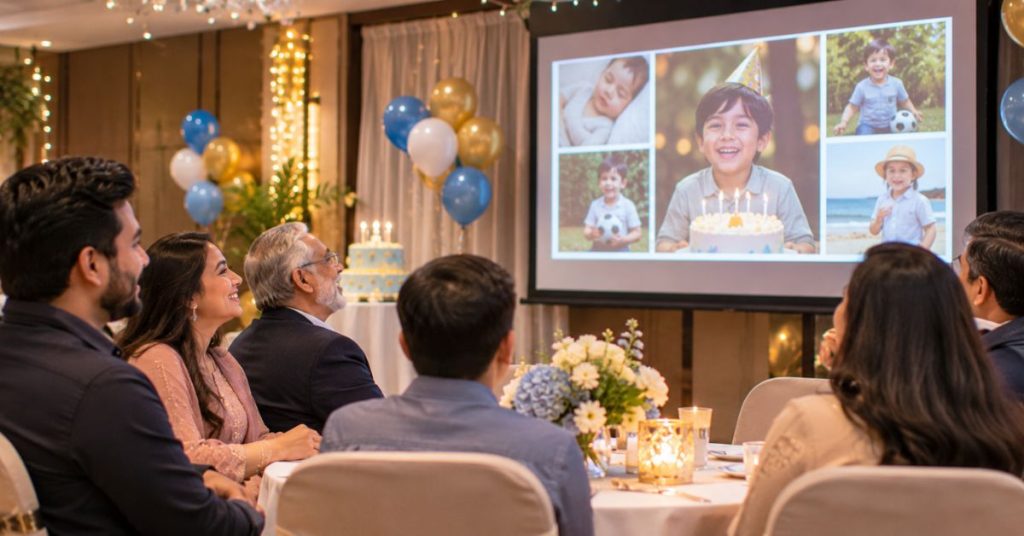
Decide whether you want a featured slideshow that everyone watches together or a background display during arrivals. A featured presentation needs a clear beginning and ending. A background loop should make sense whenever someone looks up, without relying on spoken messages.
For the main screening, choose a moment when guests are seated. Playing it while people queue for the buffet means some will miss the opening. Agree a cue with the host and venue team, perhaps before cake cutting, and leave time for reactions before the next activity starts.
Build a Short Story and Set the Pace
Aim for three to five minutes as a practical starting point. Adjust this to the birthday person’s preferences and the programme, rather than treating it as a fixed rule.
Begin with a recognisable photograph and the person’s name. Move through a few meaningful chapters, such as childhood, friendships and favourite pastimes. Finish with a recent photograph and a birthday wish. You do not need to cover every year.
In your editing tool, set the canvas to the venue’s screen shape, import the selected photographs and arrange them in that order. Add captions once the sequence makes sense. Watch it without music first; unexplained jumps or repeated moments are easier to spot before the soundtrack influences your judgement.
For a four-minute example, budget around 200 seconds for 40 photographs at five seconds each, 20 seconds for video messages, and 20 seconds for opening and closing screens. Check the exported duration because transitions can affect timing.
Leave group photographs or text on screen longer. Trim repeated pictures instead of speeding up the whole slideshow to fit more in.
Collect Photographs That Add Something
Ask each contributor for a small selection, with names, approximate dates and one sentence explaining the memory. Set a submission deadline several days before the party so you have time to edit.
Request original image files where possible. Screenshots and repeatedly forwarded pictures may look soft when enlarged. Scan printed photographs, or photograph them straight on in even light, avoiding reflections.
Choose a mix of relationships and situations. A familiar expression, a shared hobby or an ordinary family meal can tell guests more than several similar holiday poses.
Keep humour affectionate. Ask a trusted relative to flag sensitive pictures, private information or jokes the birthday person would dislike. Check with parents before including photographs of other children, especially in a version you may share afterwards.
Make the Pictures and Captions Easy to See
Use one main photograph per slide. Two can work for a clear comparison, such as the same siblings pictured years apart. Crowded collages make faces harder to recognise from distant tables.
Keep portrait photographs in their natural proportions, with a plain background around them. Stretching an image distorts faces, while filling a wide screen may crop out important details.
Use short captions that explain something useful, such as “Sunday football with his cousins”. Choose a simple font and strong contrast, and keep text away from faces. Check readability from the furthest seats.
For a multilingual guest list, add brief translations where needed. Caption spoken video messages and check names and wording carefully, particularly when automatic captions are used.
Let Music and Video Support the Memories
Choose music that suits the birthday person’s taste and the mood of the photographs. One suitable track can keep a short slideshow coherent. Lower it beneath spoken messages so every word remains clear.
Invite video contributors to share one specific memory or wish in about ten seconds. Ask them to record in a quiet place, face a light source and keep the camera steady. Trim long introductions and pauses.
Use simple cuts or gentle fades between photographs. Frequent spins, zooms and flashing effects can distract from the people on screen.
Choose music with permission covering your intended use, including any later online sharing. Keep the relevant licence details with your project.
Confirm the Venue Screen and Sound Setup
Royal Palm’s birthday party venue page lists a projector, plasma TVs and an AV sound distribution system among its ballroom facilities. Confirm the arrangements for your booked space before designing the final slideshow.
Ask the venue team:
Which screen will show the slideshow, and can every table see it?
What equipment and technical assistance are included in the booking?
Which screen proportions, video format and connection should you use?
Who will start playback, and when can you test the complete file?
If you are still comparing layouts, discuss viewing positions when enquiring about Royal Palm’s event venue. Check whether decorations might obstruct the screen and whether lighting can be adjusted during playback.
Export the File and Rehearse the Handover
Export a finished video so the photographs, captions and soundtrack play together. An MP4 at 1080p is a useful starting option, subject to the venue’s playback requirements. Watch the exported file from beginning to end; checking the editing preview alone can miss export problems.
Keep a downloaded copy on the playback device and a second copy on a USB drive. Bring any agreed adapter and charger. Turn off notifications and prevent the device from sleeping during playback.
Test through the actual screen and speakers, checking the quietest message as well as the music. Give one person responsibility for starting it on the host’s cue. Decide what appears afterwards so the ending leads smoothly into the celebration.
Frequently Asked Questions
Can I make a slideshow without childhood photographs?
Yes. Build it around recent friendships, hobbies and shared experiences. Short written memories from family can add background where older photographs are unavailable.
Is a slideshow suitable for a first birthday?
Yes, as a brief feature for family and guests. Choose moments from the child’s first year and fit the screening around feeding, rest and other activities.
Should I include photographs of loved ones who have died?
Check with close family first. A warm photograph may be welcome, but consider whether a tribute fits the birthday person’s wishes and the mood of the occasion.
Can a birthday slideshow work without music?
Yes. Clear captions and an introduction from the host can give it enough context. This can suit a quieter celebration or a space with limited audio arrangements.
What should happen if the slideshow will not play?
Have the host move to the next activity while someone checks the backup. Avoid keeping everyone waiting through troubleshooting; you can share the video privately later.